
- Hot Emojis
- New Emojis
- Symbol Emojis
- Kitchen Emojis
Emoji Kitchen
Share Emoji Kitchen
- Home
- Kitchen
- Emoji Kitchen
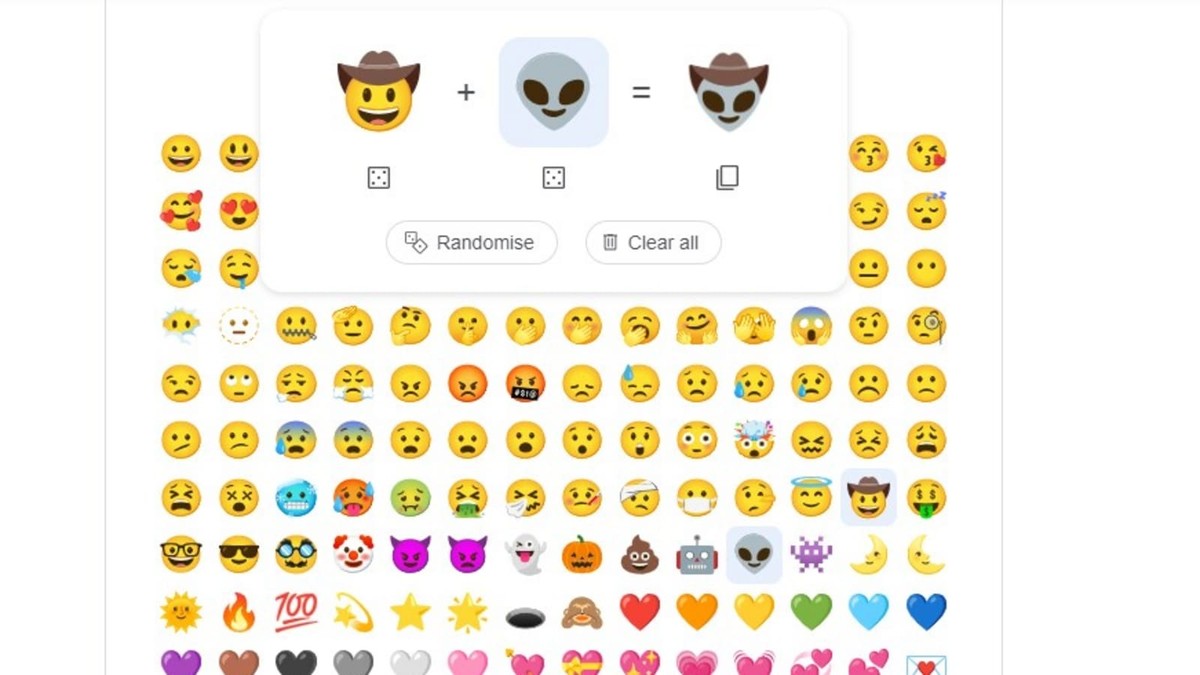
Emoji Kitchen is a fun and innovative feature developed by Google that allows users to create custom emoji combinations. It takes standard emojis and lets you blend them into unique stickers, adding a personalized touch to your digital communications. This guide will help you understand what Emoji Kitchen is and provide you with gameplay guidelines to make the most out of this creative tool.
What Exactly Is Emoji Kitchen?
Emoji Kitchen is a feature available on Google’s Gboard (Google Keyboard) that enables users to mix and match different emojis to create new, unique emoji stickers. This feature enhances the expressiveness of emojis by allowing users to create combinations that reflect more specific or nuanced emotions and situations. For instance, you can merge a laughing emoji with a cowboy hat emoji to create a laughing cowboy face, or combine a heart emoji with a face emoji to create a loving face.
The feature leverages Google’s vast emoji library and uses AI to generate these combinations, offering endless possibilities for personalization and creativity. These custom emojis can be used in messaging apps, social media, and other platforms that support sticker usage, making your conversations more engaging and fun.
Gameplay Guidelines for Emoji Kitchen
1. Accessing Emoji Kitchen
To use Emoji Kitchen, you need to have Google’s Gboard installed on your Android device. Here’s how to get started:
- Download and install Gboard from the Google Play Store if you haven’t already.
- Open any app where you can use the keyboard (e.g., a messaging app).
- Tap on the emoji icon on the keyboard to open the emoji panel.
- Select an emoji, and if it’s compatible with Emoji Kitchen, a set of suggested combinations will appear at the top of the keyboard.
2. Creating Custom Emojis
Creating custom emojis is simple:
- Choose an emoji from the Gboard emoji panel.
- Browse through the suggested combinations that appear above the keyboard.
- Tap on the combination you like to insert it into your message.
3. Experiment with Combinations
Don’t hesitate to experiment with different emojis to see what unique combinations you can create. The more you explore, the more fun and personalized your emojis will be. Try mixing different categories of emojis, such as faces with objects or animals with expressions, to see the variety of stickers you can generate.
4. Save and Share Your Creations
Once you’ve created a custom emoji that you love, you can save it and share it with your friends. Here’s how:
- Tap on the custom emoji to insert it into your message.
- From there, you can send it through your preferred messaging app or save it to your device for future use.
5. Use in Different Apps
Custom emojis created in Emoji Kitchen can be used in various apps that support image or sticker sharing. This includes popular messaging apps like WhatsApp, Facebook Messenger, and social media platforms like Instagram and Twitter. Simply create your emoji and share it directly from Gboard.
6. Stay Updated
Google frequently updates Emoji Kitchen with new combinations and features. Keep your Gboard app updated to ensure you have access to the latest emojis and creative options.
7. Have Fun and Be Creative
The most important guideline for Emoji Kitchen is to have fun and be creative. This feature is designed to let you express yourself in new and imaginative ways. Don’t be afraid to try out unusual combinations and share your unique creations with others.
In conclusion, Emoji Kitchen is a playful and creative tool that enhances your messaging experience by allowing you to create custom emoji stickers. By following these gameplay guidelines, you can explore the full potential of Emoji Kitchen and make your digital conversations more lively and personalized. Happy emoji mixing!